

You can easily change the password if you have access to your WordPress account.
1. Log in to the WordPress dashboard.
2. From the Dashboard menu, go to Users and click on Profile.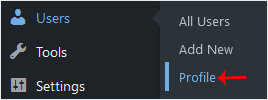
3. Scroll down to Account Management and click on Set New Password.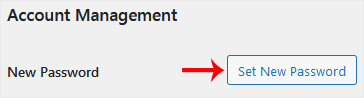
4. Copy the password to a safe place and click on Update Profile to change your password.
Categories
Abuse
2
Advanced
4
Backup/Restore
4
Billing
6
Cloudflare (cPanel)
9
CloudLinux (cPanel)
10
cPanel - Control Panel
24
Databases
11
DirectAdmin
48
DNS - Nameservers
6
Domain Management
10
Email
17
FAQ
2
Files
4
FTP
9
Hosting
6
Installation Guides
1
Installing a Control Panel
6
Logs
1
Mail Filters & SPAM
8
Mobile
11
Others
3
PayPal
7
Plesk
47
Preferences
4
Security
11
SEO
3
SiteWorx (Control Panel)
58
Softaculous
69
SolusVM
18
SSL
5
Transfers
3
Troubleshooting
10
Virtualizor
19
WHM
18
WordPress
18
Categories
How to Change the Password of a WordPress Account Print
- 0
Was this answer helpful?
Related Articles
Create Staging in Softaculous
Overview
This guide will help you how to Stage an installation. You can stage an...
How to Access the WordPress Admin Dashboard
WordPress is an easy to work with CMS software. To access a WordPress account, please follow...
How to Remove Sample Comments and Posts From WordPress
You get sample comments and posts in a fresh WordPress install. You can easily remove them in the...
How to Write and Publish Your First Blog Post in WordPress
Writing your first blog post is a fascinating thing. Follow the steps below to do so in...
How to Remove a Post in WordPress
You can remove the published or draft post in WordPress.1. Log in to the WordPress dashboard.
2....